Your Google Calendar™ and Tasks, as a Gantt chart.
CalGantt turns the events and tasks you already have into an interactive Gantt chart inside Google Sheets™. Drag a bar and the event moves in Google Calendar. Nothing to copy, no new app to learn.
Two-way sync
Your changes go straight back to Google Calendar and Google Tasks.
No server
CalGantt runs in your Google account. We never receive your data.
No emails to guests
Moving or finishing an event never notifies the people invited.
Google Calendar shows days. Projects need a timeline.
Most people plan in Google Calendar and Google Tasks, then copy everything into a project tool or a spreadsheet template that is out of date the next day.
Calendar has no Gantt view
CalGantt draws every event and task on one timeline, week after week.
Templates don’t sync
A Gantt template is a copy. CalGantt reads your calendar each time and writes your changes back.
One more tool to learn
CalGantt opens in Google Sheets, with the Google account you already use.
Three steps, about two minutes
- 1
Install CalGantt
From the Google Workspace Marketplace, with your Google account.
- 2
Open it in a sheet
In any Google Sheet: Extensions → CalGantt → Open Gantt chart. Choose the calendars and task lists to show.
- 3
Plan and drag
Move, stretch, link and finish tasks. Google Calendar and Google Tasks are updated at once.
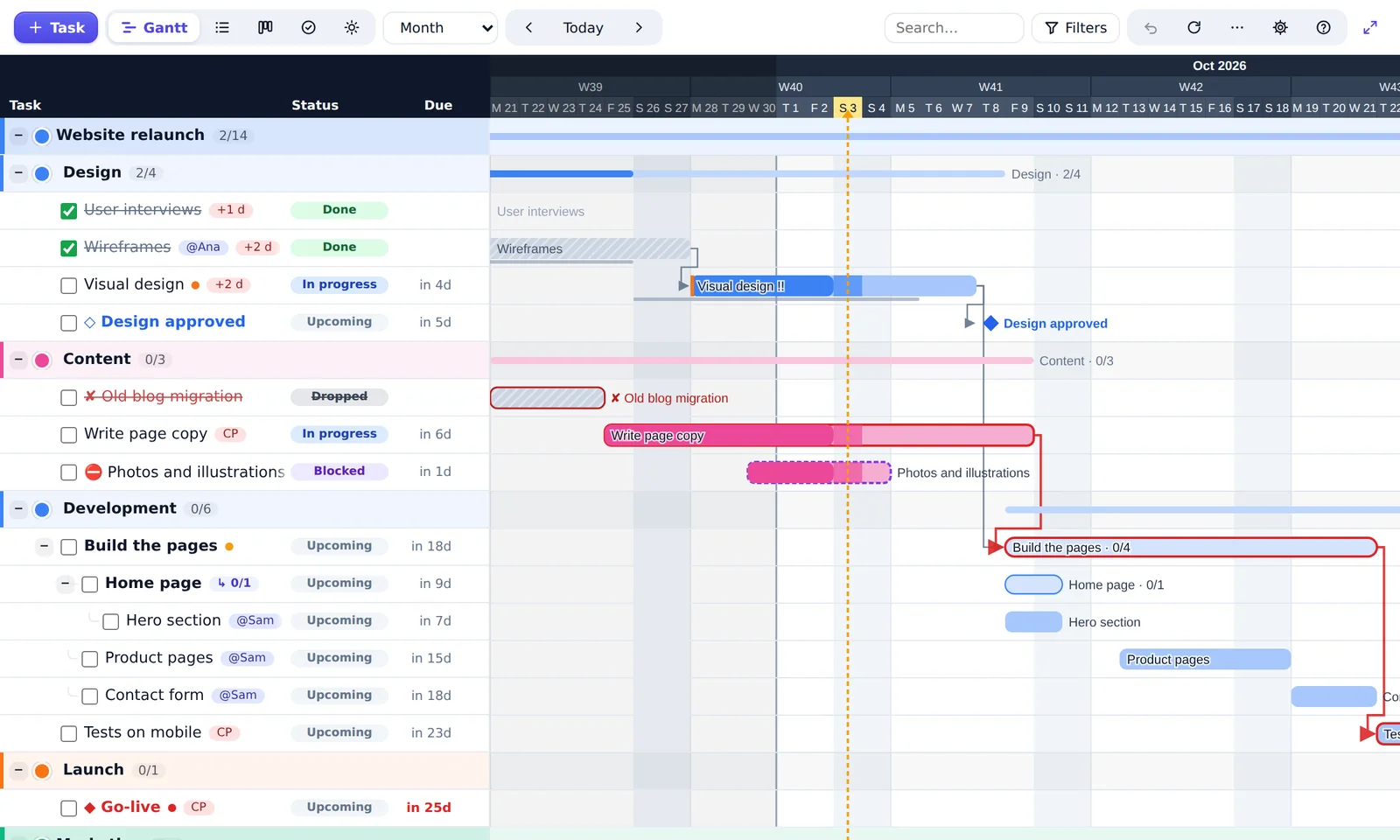
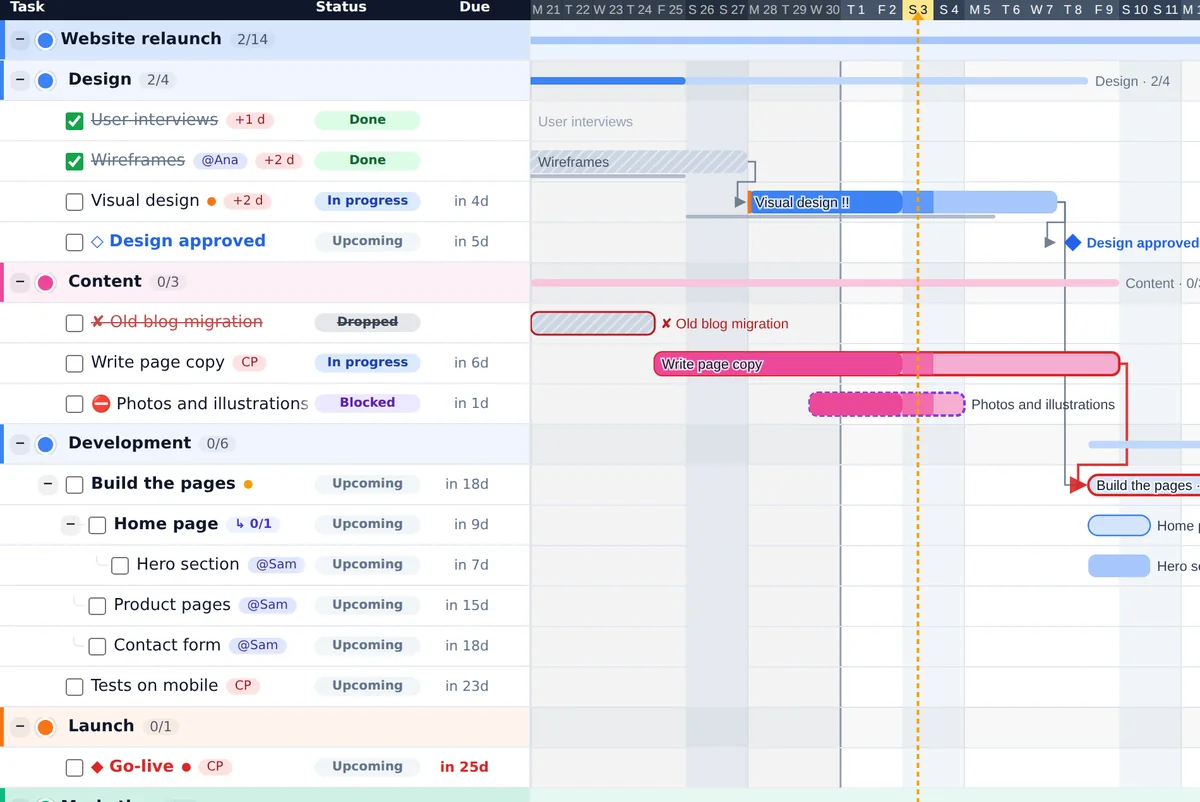
A real Gantt chart, made from your calendar
Every event becomes a bar, every deadline a diamond. Drag to reschedule, stretch to change the length: the change is saved in Google Calendar.
- Dependencies, with the critical path in red
- Milestones, deadlines and subtasks on 3 levels
- Baseline: compare today’s plan with the first one
- Week, month, quarter or whole-project view
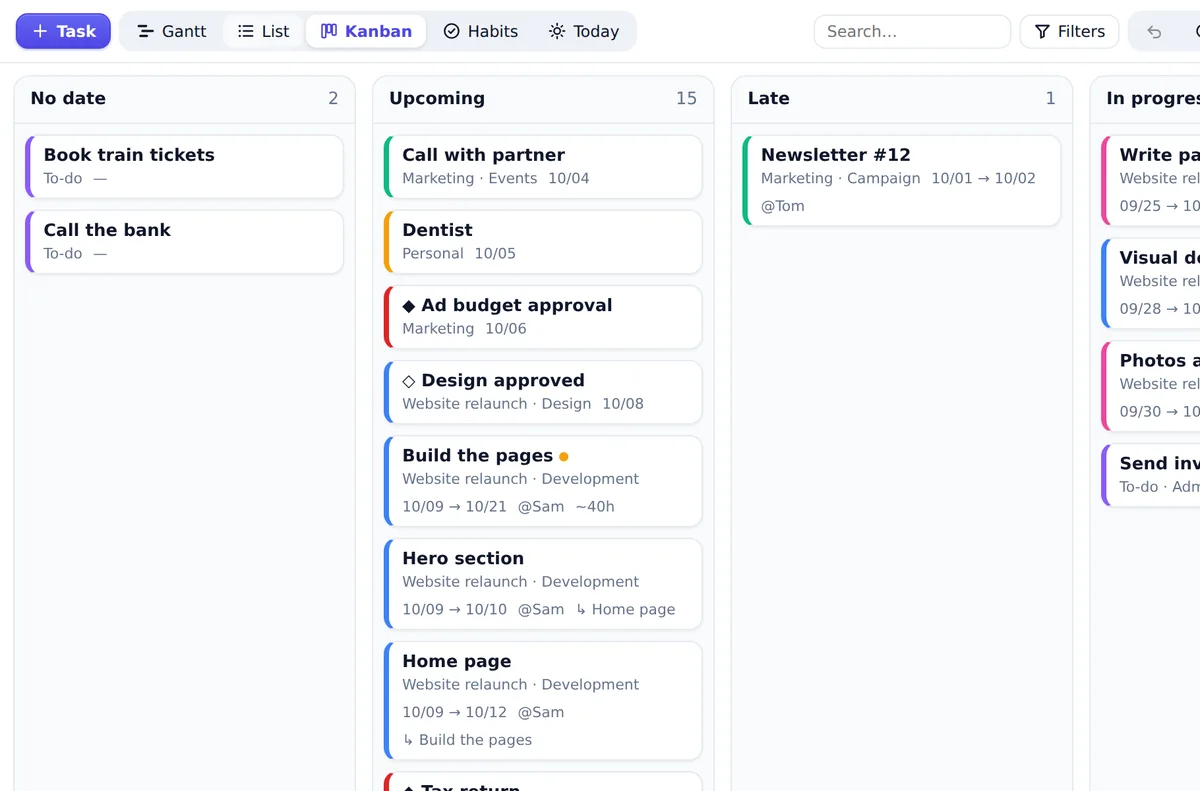
Kanban and Today, for the daily work
The same tasks, seen another way. Move a card to Done and the event is marked done in Google Calendar.
- Kanban by status: upcoming, late, in progress, done
- Today: what is due, late or starting this week
- Habit tracker for repeating tasks
- List view with search and filters
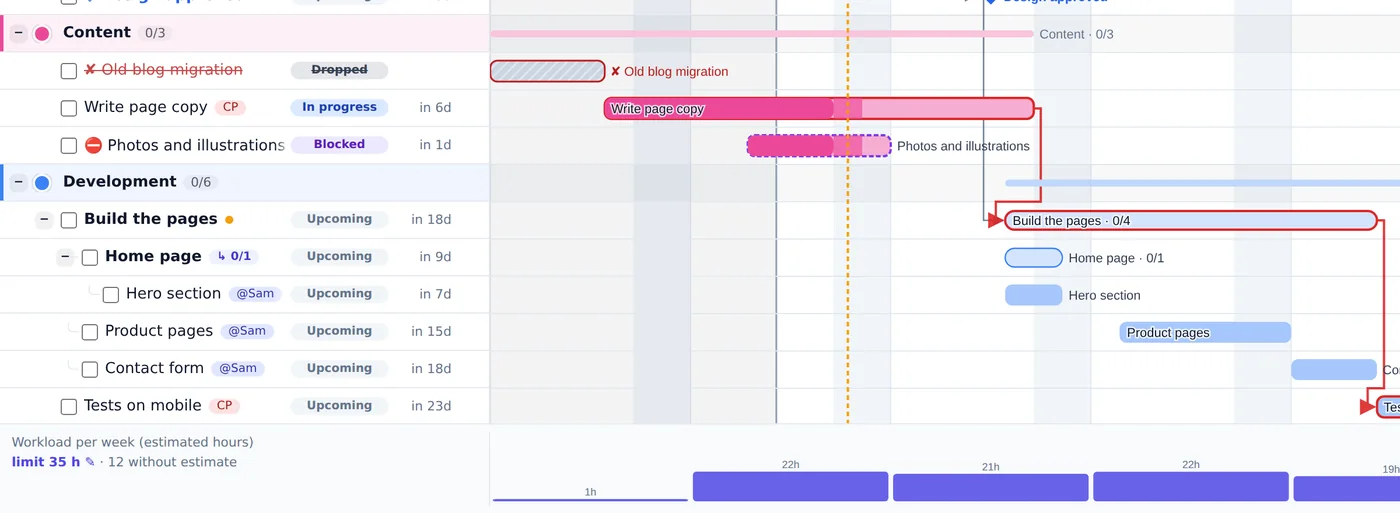
See who does what, and who has too much
Add people and an estimate in hours to a task. CalGantt shows the workload of each week and lets you filter by person.
- Owners and estimates on every task
- Weekly workload with your own limit
- Filters by person, status or calendar
- One shared sheet, each person with their own calendars
Quick to fill in, easy to share
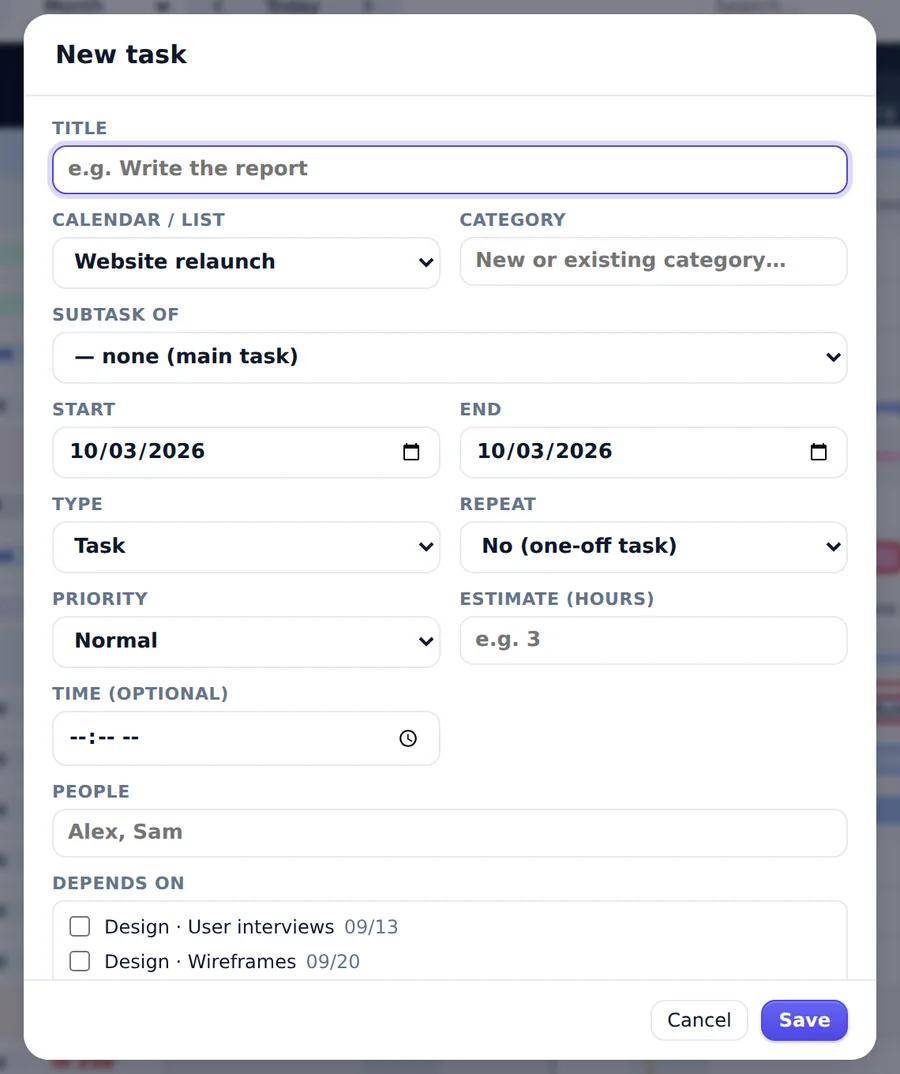
Create a task in a few seconds: calendar, category, dates, priority, people, repeat and links in one form.
- Undo with Ctrl+Z, even a deletion
- PNG export; multi-page PDF and sheet export in Pro
- Project templates and import from plain text
- Light and dark mode
A Gantt template, or CalGantt?
Templates are fine for a fixed plan. CalGantt is for plans that live in your calendar.
| Gantt template in Sheets | CalGantt | |
|---|---|---|
| Reads your Google Calendar events | ||
| Writes your changes back to Google Calendar | ||
| Includes Google Tasks | ||
| Drag and drop on the timeline | ||
| Dependencies and critical path | By hand | |
| Workload per person | By hand | |
| Up to date by itself |
Your data stays in your Google account
CalGantt runs in Google Apps Script, with your own Google account. We have no server and no database: your calendar never reaches us.
No server
Events are read and written directly between Google Sheets and Google Calendar. Nothing passes through us.
No emails to guests
CalGantt never sends invitations, updates or cancellations to the people invited to your events.
Only what it needs
Your calendars, your Google Tasks and the open spreadsheet. It cannot open your other files or your email.
Leave anytime
“Remove my data from this spreadsheet” clears your hidden tabs and settings. Uninstalling removes its access.
Simple prices and a real free plan
Every account starts with a 14-day Pro trial. No card, nothing to cancel: after 14 days you simply keep the free plan.
Free
- 2 calendars or task lists (holiday calendars are free)
- Gantt, List and Today views
- Drag and drop, two-way sync
- PNG export
Pro
- Unlimited calendars and task lists
- Subtasks (3 levels)
- Kanban and habit tracker
- Dependencies and critical path
- Templates and text import
- Baseline and workload
- Multi-page PDF and sheet export
Monthly pass
- Everything in Pro
- Made for a short project
- No subscription: nothing renews
Team
- Pro for everyone with your company email (@yourcompany.com)
- One key for the whole team
- Not for gmail.com addresses
Online payment opens soon. Prices in euros.
Not happy? Write to us within 14 days of your purchase for a full refund.
Questions people ask
Is CalGantt free?
Yes. The free plan works with 2 calendars or task lists (holiday calendars are free) and has no time limit. Pro adds unlimited calendars, Kanban, dependencies, workload and more. Every account can try Pro free for 14 days.
Does CalGantt change my Google Calendar?
Only when you do. Moving a bar moves the event, ticking a task marks it done. CalGantt never changes anything on its own, and your last changes can be undone.
Will my guests receive emails?
No. CalGantt saves your changes without sending invitations, updates or cancellations to guests.
Where is my data stored?
In your Google account: in Google Calendar, in Google Tasks and in hidden tabs of the spreadsheet. We have no server and never receive your data.
Can my team use the same sheet?
Yes. Each person opens CalGantt with their own Google account and sees the calendars they can access. Each person’s planning is kept in their own tabs.
Does it work with Google Workspace accounts?
Yes, with personal Google accounts and with Google Workspace accounts. In some companies, an administrator must first allow the add-on.
Does it work on a phone?
No. Google Sheets add-ons only run in a browser on a computer. Your changes still appear in Google Calendar on your phone.
What happens when the trial ends?
You stay on the free plan. Nothing is deleted: your events and tasks stay in Google Calendar and Google Tasks.
Is the monthly pass a subscription?
No. You pay once for 1 to 6 months. When it ends, you go back to the free plan, unless you buy again.
Which languages does CalGantt speak?
English and French. CalGantt follows your language, and you can change it in “Calendars and settings”.
Plan your next project where your time already is.
Your calendar, your tasks, one timeline.
How to install